QR ordering for cafes and small restaurants
Scan, order, cook, pay. One QR.
Guests scan a QR at the table, order from your branded menu and pay by UPI. Every order lands on your Orders page within seconds on a working connection, and on the kitchen screen from Starter up.
Start free, no card. Every new account gets 14 days of Starter, kitchen display included.
Free plan, no card, no expiry · Starter ₹7,500 + 18% GST = ₹8,850 a year2.5 to 3% on online payments, nothing on counter orders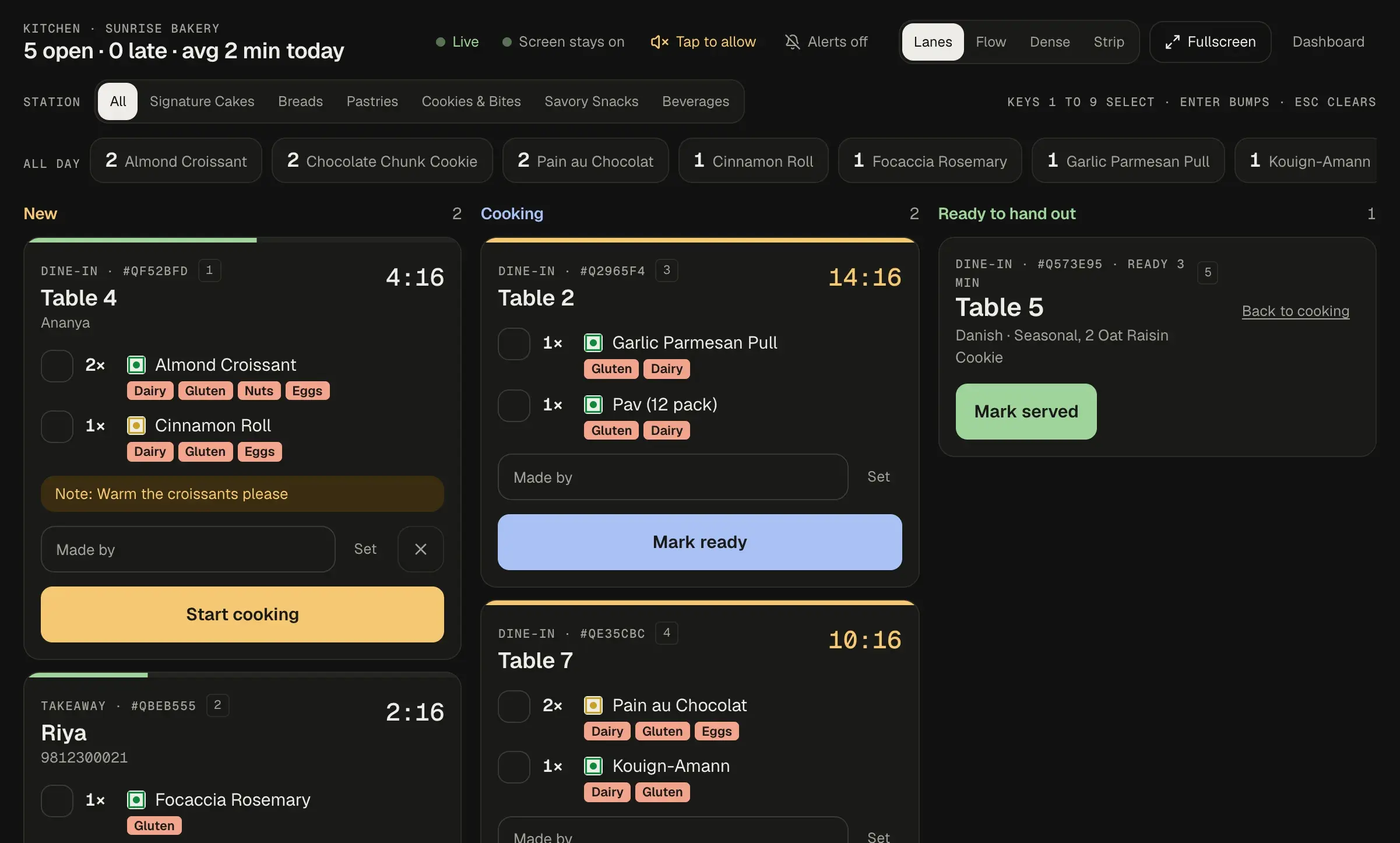
How it works
From the table to the kitchen in one scan
Four steps, no waiter with a notepad.
A folded table tent with a QR code labelled Scan to order, Table 4, Sunrise Cafe.
Step 1: Scan
One QR per table. Print it on a tent, a sticker or a poster; it never changes, even when the menu does. Table tent PDFs you print (A5 landscape, one per page, with crop marks); nothing physical ships.
A phone showing menu rows with prices and a cart bar reading 3 items, ₹220.
Step 2: Order
Your menu in your colours. Guests pick sizes, sugar, milk and spice (Starter and up), then add to cart.
A kitchen ticket: two Masala Chai, full with less sugar and a note saying no ginger please, one Veg Puff with extra chutney, sent to kitchen at 12:42.
Sample data
Step 3: Cook
Starter and upThe ticket appears on the kitchen screen within seconds on a working connection, with every customisation spelled out. On Free it lands on your Orders page instead.
A GST bill: subtotal ₹220, GST 5% ₹11, total ₹231, paid by UPI, invoice INV-2026-0042.
Sample data
Step 4: Pay
UPI at the table or at the counter, on every plan. GST invoice: Pro, numbered and ready the moment the order is marked paid.
What you get
Six parts of one product
Each one is marked with the plan it starts on. No badge means every plan, including Free.
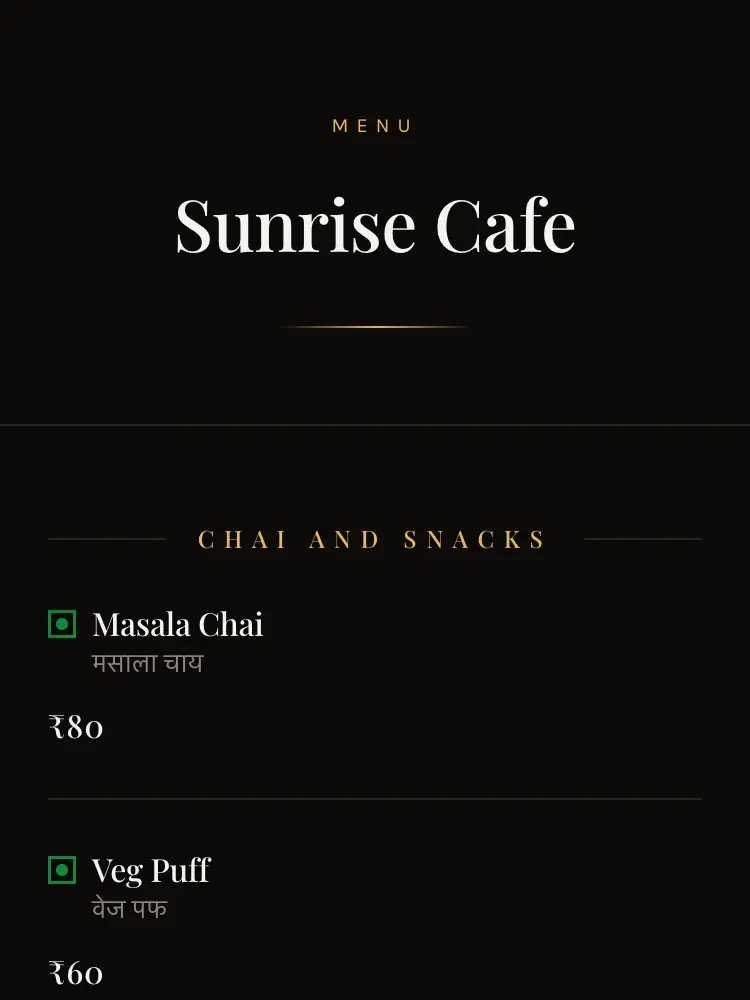
Your menu, your look
Ten themes, three of them free. Change the look any time; the printed QR keeps working. Sold-out toggles and opening hours on every plan.
- Item names in a second language: the AI translates them to Hindi, Tamil, Telugu, Kannada, Malayalam, Bengali, Marathi and Gujarati on Pro, review before publishing. The diner interface is English.
Ordering that gets the details right
Sugar level, oat milk, extra spicy. Guests choose, prices update, the kitchen reads exactly what was asked for. Plain ordering is on every plan; sizes and add-ons: Starter.
- Orders land on your Orders page on every plan, with mark paid for counter orders; the live kitchen board is Starter and Pro.
- Dine-in, takeaway and delivery; takeaway and delivery each with its own charge and minimum order. You deliver with your own rider; QRated takes the order, address and payment.
The customise sheet for Masala Chai: size Full at ₹80, sugar Less, milk Regular, quantity 2, add for ₹160.
A kitchen screen instead of a whiteboard
Starter and upNew orders arrive live with table number and age. Tickets turn amber when they wait too long. One tap moves them along.
- Owner and manager logins on every plan; the kitchen login opens the kitchen screen on Starter and Pro.
- Runs in the browser on any phone, tablet or old laptop with wifi. Any device on Chrome 110+, Safari 16+ or Edge from 2019 or newer. No printer needed.
Sample data
UPI payments, no aggregator cut
Guests pay by UPI. Money settles to your bank. QRated charges 2.5 to 3% on online payments, plus GST on the fee, and nothing on counter orders.
How settlement worksThe diner's order page for a served dine-in order at table 4: two Masala Chai and one Veg Puff, subtotal ₹220, GST ₹11, total ₹231, paid by UPI.
Sample data
- Aggregator commission on a delivery order, 16 to 30%
- QRated platform fee on an online payment, 2.5 to 3%
Not the same job. The aggregator brings you the customer and the rider; QRated charges only for taking the payment from a guest already at your table.
Source: Business Standard, 9 June 2025, fetched 28 August 2026. Rates vary by city, order value and negotiated terms and exclude GST, gateway and advertising charges.
Coupons without the spreadsheet
Starter and upSet a code, a discount, a minimum order and a limit per customer. The menu applies it, the bill shows it, the limit is enforced automatically, not by your staff.
See coupons in the demo cart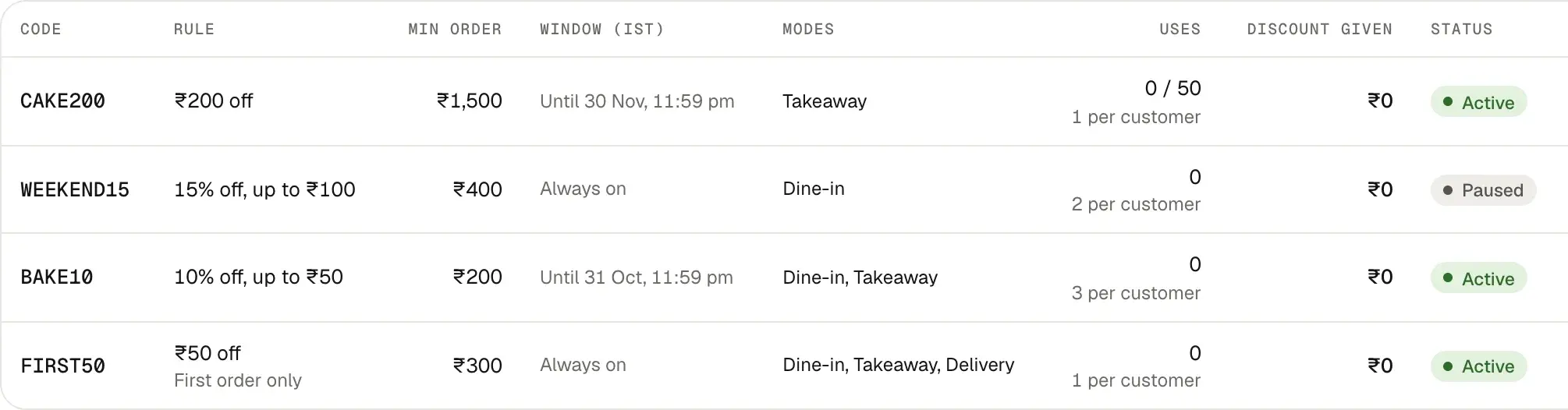
Sample data
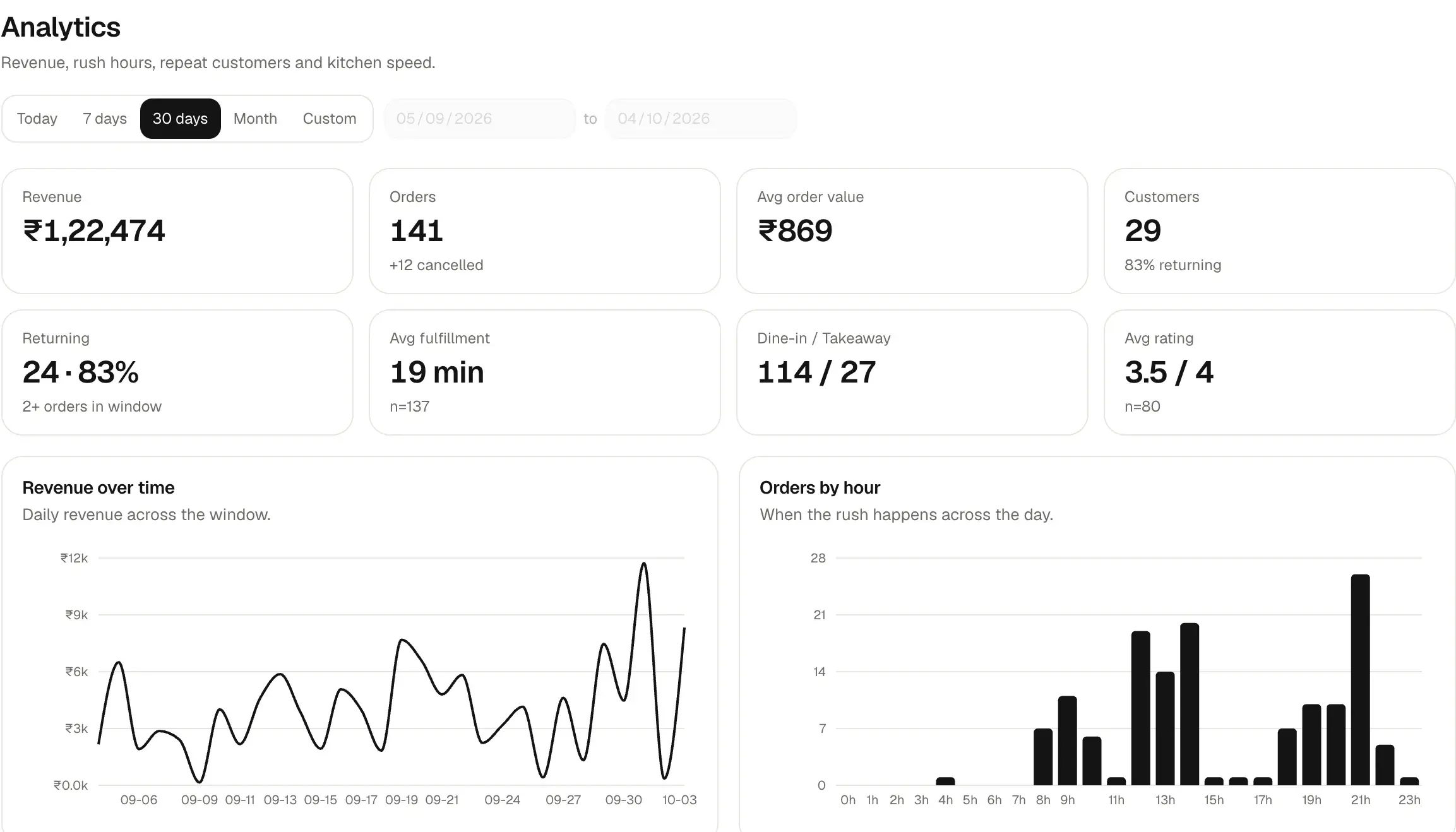
Daily numbers and GST invoices
Starter and upRevenue, orders by hour, top items and returning guests. On Pro, a numbered GST invoice on every paid order for your CA.
- Guest phone numbers are collected at checkout for takeaway and delivery (marketing consent on Pro) and stay yours; export them from Orders. Data is hosted in Mumbai and deleted on request.
Sample data
Pricing
About ₹24 a day for Starter
₹7,500 + 18% GST = ₹8,850 a year, one UPI autopay debit. Start free, upgrade when the caps pinch.
14-day Starter trial on every new account, no card. The platform fee stays at the Free rate of 3% during the trial and drops when you subscribe. On day 15 you keep Free unless you upgrade: items past the 50-item Free cap are hidden from the menu, not deleted, and your printed QR keeps working.
Free
Run your QR menu free.
₹0· no card, no expiry
Menu, QR kit, orders, counter and online payments
3% platform fee on online payments, nothing on counter orders
- 50 menu items
- Orders
- 3 of 10 themes
- Printable menu PDF
- Table tents
- 1 outlet
- Unlimited tables and QRs
- Owner + manager logins
- UPI only, no cards
- Email support
Not included: kitchen display, analytics, invoices.
Starter
For cafes and small restaurants that take orders all day.
₹7,500per year
+ 18% GST = ₹8,850 a year, about ₹24 a day
₹7,500 before GST, about ₹625 a month. Input credit depends on how you bill food GST; ask your CA.
2.75% platform fee on online payments, nothing on counter orders
Everything in Free, plus
- Unlimited menu items
- Analytics
- Kitchen display
- Customer list
- Help requests inbox
- Coupon codes
- Kitchen tickets (KOT)
- Inventory & Expense
- All 10 themes
- Printable menu PDF in every layout
- Sizes and add-ons
- 1 outlet
- Unlimited tables and QRs
- Owner + manager logins
- UPI only, no cards
- Email support
Not included: GST invoices, AI tools.
Pro
For shops that want AI menu tools and GST invoices.
₹10,000per year
+ 18% GST = ₹11,800 a year, about ₹32 a day
₹10,000 before GST, about ₹833 a month. Input credit depends on how you bill food GST; ask your CA.
2.5% platform fee on online payments, nothing on counter orders
Everything in Starter, plus
- 50 AI photo enhancements a month
- 200 AI menu translations a month
- 100 AI descriptions a month
- GST invoice PDF
- Guest consent for WhatsApp offers; you export and send them
- 1 outlet
- Unlimited tables and QRs
- Owner + manager logins
- UPI only, no cards
- Email support
Online payments carry a platform fee on the bill total after any discount, including food GST and any packaging or delivery charge, Free 3%, Starter 2.75%, Pro 2.5%, plus 18% GST on the fee. You choose in Settings whether the guest pays it on top or it comes out of your settlement. Nothing on counter orders.
Plan prices exclude 18% GST. Annual totals including GST: Starter ₹8,850 and Pro ₹11,800. Whether you can claim input credit depends on how you bill food GST; ask your CA.
Limits on every plan: 1 outlet, unlimited tables and QRs, owner and manager logins, UPI only (no cards), email support. Multi-outlet: planned, no date.
Before you go live
A ₹500 order on Starter, fee 2.75%: if you absorb the fee, ₹13.75 fee + ₹2.48 GST on the fee, ₹483.77 settles to your bank. If the guest pays it, the guest pays ₹516.23 and ₹500 settles.
- Who pays the fee is your choice in Settings, under Payments.
- You get a GST tax invoice for our fees and your subscription from Settings.
- Guest refunds come from the restaurant: online from its own share of that order before it settles, or in person at the counter. QRated's platform fee and the GST on it are not refundable.
- Settlement
- Cashfree settles to your bank on its standard cycle, T+1 or T+2 bank working days depending on the cycle your account is given; the default is T+2. Cashfree and your bank control that timing, not us. Cashfree's settlement schedule.
- Documents
- PAN and a UPI ID; Cashfree may ask for address proof or company documents (business PAN, GST, CIN). Activation usually takes a working day. If approval is delayed, your menu and counter orders keep working.
- Renewal
- Stop renewal any time from Settings; the paid year is non-refundable. If a renewal debits and you tell us within 7 days without having used the paid features, we refund it in full.
How it compares
Next to a POS quote and an aggregator
| QRated | POS and QR ordering vendors (Petpooja, DotPe) | Aggregators (delivery) | |
|---|---|---|---|
| QR ordering at the table | Yes, every plan | Petpooja: in the Core plan and up. DotPe: offered; pricing on request | Not offered |
| Kitchen display | Starter and Pro | Petpooja: an add-on. DotPe: offered; pricing on request | Not offered |
| Commission or fee | 2.5 to 3% on online payments, nothing on counter orders | Petpooja: a yearly licence, no per-order commission on its pricing page. DotPe: pricing on request | Delivery orders: 16 to 30% commission |
| Annual price | ₹0, ₹7,500 or ₹10,000, plus 18% GST | Petpooja: Core ₹10,000, Growth ₹20,000, Scale ₹40,000 per outlet per year, before hardware (petpooja.com/pricing, 28 Aug 2026; varies by region). DotPe: pricing on request | No licence fee; commission per order |
| Contract length | One year; stop renewal any time; no monthly plan | Petpooja: per year. DotPe: pricing on request | Per order; no annual licence |
| Own-brand menu | Yes, on your own link and QR | Petpooja: Scan & QR Order in Core. DotPe: own-brand web store; pricing on request | Not offered; your menu lives inside their app |
| Outlets | 1 per account; multi-outlet planned, no date | Petpooja: priced per outlet. DotPe: pricing on request | Each outlet is its own listing |
QR ordering at the table
- QRated
- Yes, every plan
- POS and QR ordering vendors (Petpooja, DotPe)
- Petpooja: in the Core plan and up. DotPe: offered; pricing on request
- Aggregators (delivery)
- Not offered
Kitchen display
- QRated
- Starter and Pro
- POS and QR ordering vendors (Petpooja, DotPe)
- Petpooja: an add-on. DotPe: offered; pricing on request
- Aggregators (delivery)
- Not offered
Commission or fee
- QRated
- 2.5 to 3% on online payments, nothing on counter orders
- POS and QR ordering vendors (Petpooja, DotPe)
- Petpooja: a yearly licence, no per-order commission on its pricing page. DotPe: pricing on request
- Aggregators (delivery)
- Delivery orders: 16 to 30% commission
Annual price
- QRated
- ₹0, ₹7,500 or ₹10,000, plus 18% GST
- POS and QR ordering vendors (Petpooja, DotPe)
- Petpooja: Core ₹10,000, Growth ₹20,000, Scale ₹40,000 per outlet per year, before hardware (petpooja.com/pricing, 28 Aug 2026; varies by region). DotPe: pricing on request
- Aggregators (delivery)
- No licence fee; commission per order
Contract length
- QRated
- One year; stop renewal any time; no monthly plan
- POS and QR ordering vendors (Petpooja, DotPe)
- Petpooja: per year. DotPe: pricing on request
- Aggregators (delivery)
- Per order; no annual licence
Own-brand menu
- QRated
- Yes, on your own link and QR
- POS and QR ordering vendors (Petpooja, DotPe)
- Petpooja: Scan & QR Order in Core. DotPe: own-brand web store; pricing on request
- Aggregators (delivery)
- Not offered; your menu lives inside their app
Outlets
- QRated
- 1 per account; multi-outlet planned, no date
- POS and QR ordering vendors (Petpooja, DotPe)
- Petpooja: priced per outlet. DotPe: pricing on request
- Aggregators (delivery)
- Each outlet is its own listing
Sources, fetched 28 August 2026: petpooja.com/pricing Core ₹10,000, Growth ₹20,000, Scale ₹40,000 per year per outlet; Scan & QR Order in Core; local pricing may vary by region and currency; petpooja.com/kitchen-display-system lists the kitchen display under add-ons; dotpe.in/f-b-page.html names a KDS and an online web store and says pricing depends on your needs; Business Standard, 9 June 2025 Zomato and Swiggy typically charge restaurants 16 to 30 per cent commission. Re-checked by us before every copy change; tell us if a cell is out of date.
Getting started
We set your menu up, free in your first month
QRated went live in August 2026 and we are onboarding our first cafes now. We would rather set your menu up ourselves than print a customer count.
Or send your menu to hello@palinntech.com and we will reply within 24 hours.
- Menu setup
- Import from a CSV file on any plan, or email us your current menu: menus up to 150 items, set up once within 2 working days, in your first month; photos not included.
- Leaving
- Export your menu and your guest list any time. Your QR is a link you own; nothing here holds your data hostage.
FAQ
Questions cafe owners ask us
Do my guests need to download an app?
No. The QR opens your menu in the phone's browser. Ordering and UPI payment happen there too.
Do I need a POS or a card machine?
No. QRated takes the order and the payment. If you already run a POS, keep it for the counter and use QRated for tables and takeaway. Orders export as CSV for your accountant.
What about Swiggy and Zomato?
Keep them for discovery if you like. QRated is for guests already at your door: you pay 2.5 to 3% on online payments and nothing on counter orders, instead of a per-order commission. For delivery you use your own rider; QRated takes the order, the address and the payment.
What happens if the wifi drops?
Orders arrive within seconds on a working connection. If the kitchen screen drops offline it catches up on reconnect. Every order also lands on your Orders page on every plan; the live kitchen board is Starter and Pro. Guests on mobile data keep getting the menu.
A guest paid but the order did not reach the kitchen. What do I do right now?
Refresh the kitchen screen. Every time it loads it asks Cashfree about any order from the last 24 hours that is still waiting on payment and pulls the paid ones onto the board; the guest's own order page runs the same check every few seconds. If it is still missing, open Orders and search the order number on the guest's phone. If it shows as unpaid, the money did not reach Cashfree, and the guest's UPI app shows the transaction as failed or pending, which their bank reverses. Cook the order and settle at the counter if you like. Then email hello@palinntech.com with the order number; we reply within 24 hours.
How does UPI settlement work?
Guests pay by UPI through Cashfree. Cashfree settles to your bank on its standard cycle, T+1 or T+2 bank working days depending on the cycle your account is given; the default is T+2. Cashfree and your bank control that timing, not us. The platform fee is the only charge, plus 18% GST on the fee; gateway costs are included. Guest refunds come from the restaurant: online from its own share of that order before it settles, or in person at the counter. QRated's platform fee and the GST on it are not refundable. An online refund reaches the guest in 5 to 7 working days.
Cashfree's settlement scheduleHow do I cancel, and is there a refund?
Stop renewal any time from Settings; the paid year is non-refundable. If a renewal debits and you tell us within 7 days without having used the paid features, we refund it in full. Your UPI app notifies you 24 hours before each debit. If autopay stops, your account drops to Free: nothing is deleted and your printed QR keeps working.
What documents do I need?
PAN and a UPI ID; Cashfree may ask for address proof or company documents (business PAN, GST, CIN). Activation usually takes a working day. If approval is delayed, your menu and counter orders keep working.
Why not just my PhonePe QR sticker?
If all you need is payment, a static UPI QR is free and you should keep it. It takes money but takes no order: no table number, no item choices, no kitchen ticket. QRated takes the order, the table and the customisations, puts the ticket in front of the kitchen and charges 2.5 to 3% only for the payment part, nothing when the guest pays at the counter.
Are the invoices GST compliant?
On Pro, once you add your GSTIN in Settings, every paid order can carry a sequential invoice with your GSTIN, place of supply and the CGST and SGST split. Composition-scheme outlets, which must issue a bill of supply, are not supported yet. Your CA confirms compliance for your registration; download the sample and check it with them.
Sample invoice (PDF)Do I need a printer or special hardware?
No printer and no KOT printing: the kitchen screen replaces the chit. It runs in the browser on any phone, tablet or old laptop with wifi. Any device on Chrome 110+, Safari 16+ or Edge from 2019 or newer. Bills are digital; print them if you like.
Do you support takeaway and delivery?
Yes. Turn on takeaway and delivery in Settings; takeaway and delivery each have their own charge and minimum order, dine-in has neither. Guests choose the mode in the cart. You deliver with your own rider; QRated takes the order, the address and the payment.
Can I run more than one outlet?
One outlet per account today. Multi-outlet is planned, with no date.
Can I import my existing menu?
Import from a CSV file on any plan, or email us your current menu: menus up to 150 items, set up once within 2 working days, in your first month; photos not included.
Can the menu be in Hindi or another language?
The diner interface is English. Item names in a second language show under the English name: on Pro the AI translates them to Hindi, Tamil, Telugu, Kannada, Malayalam, Bengali, Marathi and Gujarati, then review before publishing.
What if I edit the menu after printing the QR?
Nothing changes on the print. The QR points to a fixed short link; items, prices and themes update behind it as soon as you save.
Questions? hello@palinntech.com, replies within 24 hours.
Put a QR on the table this week.
- 10 minutes to a live menu with the spreadsheet import
- An afternoon to type a full menu in by hand and print tents
- Usually one working day for Cashfree approval before UPI payments
Free plan, no card and no expiry. Online payments once Cashfree approves your account.
Free plan, no cardStarter ₹8,850 a year with GST
Start free